Wednesday, February 8, 2012

Techie Life vs. Tequila


My barber is younger but unlike me he has been enjoying more his Tequila than a Techie Life.

After my trips last month to the International Consumer Electronics Show (CES) 2012 in Las Vegas,  Nevada and the MACWORLD/iWorld Conference in San Francisco, California,  it looks like the interest to learn and make use of new gadgets  grew on him.

He already has a smartphone but has been seeing me with my iPad 2 not just in the barbershop but everywhere I go. He wants to know its features and uses as he also intends to buy one.

He offered me a bottle of Tequila to describe my chosen Techie Life.

My iPad 2 has a memory capacity of 64 GB (gigabytes) – the highest and most powerful among the iPad 2s. To appreciate this powerful and large capacity; if I put only eBooks/documents in the device, I could store more than 60 million pages of documents or eBooks. That’s the entire library of a school, college, or community.

But I do not do that. This is because I also download and store songs, videos, photos and applications to complete my personal library.

SONGS

As I write this article, I notice that I have 131 songs. I have downloaded or synced through ITunes with my MacBook Pro the songs of Frank Sinatra (Duets I & II), Tony Bennett, Julio Iglesias, Michael Buble, Harry Belafonte, Ray Charles and Stevie Wonder. Of course, several albums of the Beatles are also stored and accessible. A new special album of budding young singer Jason Myles Goss is one that I play very often because it contains my favorite song, “Coffee in the Morning, Wine at Night”.  I also have varied versions from different artists of some Christmas songs like Jingle Bell Rock and Oh Holy Night and various interpretations of the U.S. National Anthem (like Marvin Gaye’s and his duet with his daughter), America the Beautiful and many more.

VIDEOS

I currently have 140 videos in my device.  They were mostly downloaded from You Tube, from TED, home movies taken from my video camera, from some selected TV shows and movies and some eHows and educational materials.

My iPad 2 has a built-in speaker, an audio player/recorder, a video player/recorder and 2 cameras that can take either still or moving pictures/videos. This means I can either listen and watch through the speaker and monitor or use an earphone/ear bud. I have several earphones but the most pleasing one with the most advanced sound technology for me is ClarityOne. I carry it with me.

PHOTOS

I have 152 photos and counting. They are mostly taken from my iPad 2 but some were downloaded from my MacBook that consist of family albums of special occasions.

I have special apps that could modify or improve the photos and edit and produce the videos.

APPLICATIONS

Currently in my device are 327 applications. I actually have more in my iTunes library but I decided to install only the said apps.

I have apps that allow me to store and access my contacts, calendars and my email messages.

Of course, my device has WiFi capability, which means that I can access the Internet anywhere there is a hot spot. In places where there are no hot spots, I subscribe to a data plan that still allows me to have Internet access. Safari is the built-in Internet browser of my iPad.

What this really means is that I can access the whole wide world.  Using search engines, I can find out any What, Where, Who, When, Why and How that are available in other computers and libraries in the world. It is about localizing global knowledge. I can easily transition from being an ignorant being to one that is learned and knowledgeable.

I have access to news in print, audio and video. I also blog and update my friends and relatives in real time, upload photos and videos also in real time.

My apps allow me to access Facebook and Twitter instantly and to communicate either with video or just plain audio with anybody anywhere for free via the Internet.

Offline, I have apps to take notes, to create documents either in word, spreadsheet, and presentation. I can do any of these either by writing using stylus, typing, touching the screen or even speaking or dictating.

I could convert documents into the iBook or eBook format. I could store, retrieve and search them speedily. I could create music regardless of quality.

I also have a software app that allows me through my iPad to access my other computers remotely.

Of course, I have embraced what Techies call the “Cloud”. Instead of storing my personal or business library of documents, photos, songs, videos and other files in an offline hard disk, I can now store them in the “Cloud” or online for easy retrieval through my device.

In my next columns, I will specify and describe these and more amazing apps that now occupy my Techie Life.

More apparent than real, their effects seem to becloud my vision of life. But this I am sure – the effect on my vision is not as “cloudy” as that of Tequila.



Thursday, February 2, 2012

PRODUCT REVIEWS:


iPAD Stands and Covers 
 
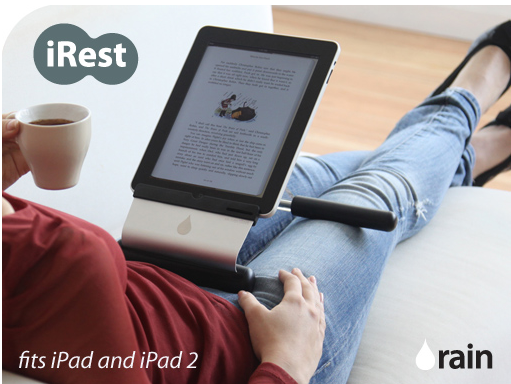
1.          iRest Lap Stand

            The iRest is the first tablet stand designed specifically for use on the   lap.  It frees your hand for a comfortable viewing and typing experience away from the desk.

            Created by award winner Rain Design, Inc. iRest is exceptionally light at only 15 oz. and its aluminum quite thin with 1.5mm or 1/16 of an inch.

            The iRest also features soft foam cushions that rest on the lap and a   torque hinge that makes it easy to adjust the angle up to 60       degrees.  It   prevents hand fatigue from holding the iPad and raising    the screen for easier viewing.

            I tried it at home. It is very simple, sturdy and comfortable to use. It is also            reasonably priced. I like it.

            It was awarded Best of Show at the MACWORLD in 2011.


2.   iBallz

Does your iPad have balls? If none, having the iBallz would provide  you with
balls that would make your iPad safe even when it falls. With its carrying case, you can safely transport your device around the house, office or on errands. The zip off cover allows for quick access to your iPad, so you are not constantly pulling it in and out.

            It also allows for several comfortable positions like: resting on your lap, hanging from    or leaning against a wall, tilted up towards you on your desk or coffee table.

            I tried it and even intentionally bounced it with my iPad. It is nice to have. Just for the guarantee of a safe landing when it falls is worth the investment.

3.   Prop’n GO

            Made by Padded Spaces this product is actually a 3 in 1 device:  Stand, Cover, and Backpack. It also has an accessory pocket so that the power cords, headphones, etc. don’t come in contact with your iPad. You should be comfortable using it on a couch, in bed or  other soft surface.

            The heights, angles, or positions are adjustable so that it would be good when reading or watching movies.

            The product could also be useful for other devices such as Kindle, Nook and other tablets – not just for the iPad. It’s a great device. I’ve    used it and I like it. Perfect on your bed, on your couch and on your desk!

4.   Powis iCase


            This is the case and stand, which is dubbed  the Kama Sutra Master Stand for the iPad.  This stand can actually be pre-designed if you pre- order. With a beautifully designed cover, the sample that was provided to me  was really as good as it was billed.

         While using it, I counted at least 9 positions. As billed, I used it for reading the news, watching a movie, playing a game, writing emails, presenting to a colleague, checking the NBA scores, and running an app. The Powis iPad case really secures your iPad in the most comfortable position for your activity.


5. REV 360


The product that the Hub International LLC provided me to review is what they call the revolutionary Hand Stand that is a Rotating iPad Case. It is called REV 360 because I assume it is revolutionary and rotates 360 degrees of “ergonomic freedom”.

It is sleek and durable. Indeed, it brings a revolutionary, rotational accessory that allows users to spin effortlessly the iPad 360 degrees for quick transition from landscape to portrait viewing and back again.

It also allows easy manipulation of the touch screen without accidentally launching apps or randomly scrolling. The Silicone iPad Case is really designed durably to provide protection for iPad 2 without scuffing. It has an elastic strap that is comfortably one-size fits all.

It is fun using it especially when I rotate the disk. This one is also worth buying.

What would interest our Filipino readers is that one of the Founders of the company is a half Filipino named Preston Hodges.

The rest of the products will be reviewed in the next issue of our paper.

Wednesday, February 1, 2012

“KAMA SUTRA” Positioning At MACWORLD


It was all MAC or “iProducts. I did not see anyone possessing a device other than a MAC computer, iPad, iPhone, iPod or some device with a MAC OS or IOS. The battle was on 3 A’s: applications, accessories and attention.

There are now about 500,000 apps and counting for iPhones and iPads. During the last quarter, there were 37 million iPhones, 15.3 million iPads, 5.2 million MACs and 15.43 iPods added to potentially download many of the apps.

I met a couple of enthusiasts who claim to have already purchased 1500 and 1800 apps respectively. I have a long way to go but I thought that I had a good start with my MACBOOK PRO, iPAD2, iPhone and IPOD and their corresponding apps.

At the MACWORLD/IWORLD Convention, I attended 3 TECH TALKS. They were all about apps that the speakers felt were useful for iPad 2 owners. 

TOP APPS FOR IPAD 2

The first TECH TALK was on the top apps for iPad 2. I already have most of them but they might interest many of the readers: 1. Facebook; 2. Twitter; 3. Skype; 4. Facetime; 5. G-Whizz;  6. Aim;  7. Localmind; 8. WordPress; 9. Blogsy; 10. Clibe; 11. Blurb Mobile; 12. Flipboard; 13. Instagram; 14. Instapad; 15. Tripit; 16. Words with friends; 17. Soundhound; 18. Match.com; 19. Dating Dna; 20. Zoosk; 21. Scout.

The last 4 apps are “dating” apps and I did not download them. I have the first 17 and I love them. If you have an iPad 2, I advise you to download them. They are mostly free and if not, each costs definitely less than $5.

PRODUCTIVITY APPS FOR IPAD 2

The second TECH TALK was on productivity apps for iPad 2. Those discussed were: 1. Evernote; 2. Baby Monitor; 3. Aroundme; 4. AudioNote; 5. Penultimate; 6. Kindle store web app for iPad; and 7. Polkast.

They obviously make iPad 2 users more productive. I also have and love all of them. My advice is, you should also download them and try them out. Again, they are mostly free.

SUPER TOOLS FOR IPAD AT WORK

The third TECH TALK was on the super tools for iPad at work. The speakers asked iPad users to embrace the cloud. They advised users to download any or all of the following: 1. Dropbox; 2. Sugarsync; 3. Box.net; and 4. iCloud. To access any of them you can use any of these apps: 1. Evernote; 2. Ipassword; and  3. GoodReader.

Some core business apps were recommended: 1. Pages; 2. Numbers; 3. Keynote; 4. Quick Office; 5. Office2; 6. CloudOn; 7. Word; 8. Excel; 9. Power Point; and 10. OnLive Desktop.

There were other core business apps mentioned : For database management, the FileMaker Go for iPad was recommended. For Task/Project Management, the apps are: 1. Omnifocus; 2. OmniGraffle; 3. Carbon Fin Outliner; 4. Instapaper; 5. PDF Expert; 6. Billings Touch; 7. Invoice2Go; and 8. TelePrompt+.

For meetings we should use the following apps: 1. Idea Flight for iPad; 2. Agendas; 3. GoToMeeting for iPad; and 4. WebEx for iPad.

For note-taking, these apps were suggested: 1. Notability; 2. Penultimate; and 3. SoundNote;

For communications: 1. Aim; 2. Beejibe; 3. iChat; 4. Skype; and 5. Whistle Phone. The last app gives you a phone number and your iPad rings when somebody calls the number.

For travel, you should download: 1. Kayak; 2. Tripit; 3. Flight Track; 4. BizXpense Tracker for iPad; and 6. TravelTracker – Personal Travel Assistant.

Other apps worth mentioning are: 1. Square; 2. LogMeIn; 3. Ignition; and 4. Air Display.

With most, if not all, of these apps downloaded in your iPAD, you are expected to be a top, productive and super user. As my barber said on this downloading advice, “Tech IT or leave it!”

There were new amazing applications that were unveiled during the show. I will discuss some of them in my next article.

“KAMA SUTRA” POSITIONING

MACWORLD/IWORLD was also a battle of accessories and attention. The most notable one was on IPad stands and covers. To get the attention of the media, the firms who were promoting their products hired their respective PR (Public Relations) firms.

One PR lady sent me an email with the following subject: “What is your favorite position?” 

In the body of the email she said, “Stay focused……I’m referring to the 9+ positions of the Powis iCase, of course.

Visit us at Booth 1049 during Macworld/iWorld and see what the Kama Sutra Master of iPad cases can do.

Want to try Powis iCases in the privacy of your room? Visit www.powisicase.com to choose the case you would like to review. Let me know and I will have it ready for you to pick up at Booth 1049.”

Thus, the PR lady defined to a certain degree one criterion that could be used in the choice of stands and covers for the iPad. Offering a sample product to try out and review was definitely a plus.

This certainly caught my attention.  Bearing that in mind I looked at similar amazing products whose PR firms also invited me to visit their booth and also  provided me with samples for review. Among them were: the iRest; the Prop’n GO; the iBalz; Proof; and Rev 360.

I will write a review on these iPad stands and covers and other MAC-related products in a separate article.


Wednesday, December 21, 2011

“Miracles” in the Sin City


My barber and some friends again had a mixed feeling of envy and joy when I told them that I am now preparing for my annual trip to Las Vegas.

Envy because somehow they think that I am given the license to “sin” especially when I go to the Sin City and Entertainment Capital of the world with a Mission Everything Possible.

They became doubly envious when I said that this year I am attending the International Consumer Electronics Show next month with a Press Pass having been validly credentialed as a Columnist, Blogger and Industry Analyst. They know the privileges and perks of being one.

But they are also joyful for me and for themselves.  While aware of the rule, “Whatever happens in Las Vegas, stays in Las Vegas”, my stories and anecdotes after my trip always gave them the feeling that they were privileged and exempted from the rule.

They know that the Pornographers’ Convention is being held at the same time as the CES Shows, so as in the past, they expect me to give some report on the former.  Again they will be disappointed, but such feelings were always overcome by my narration of the amazing technologies launched at the CES and experiences such as my getting stranded in Las Vegas and winning a semi-jackpot in poker last year.

I am going to Las Vegas a couple of days earlier.  I will attend the sessions on the “State of Consumer Electronics Industry”, the “State of the Global CE Industry” and the Official Press Event featuring the unveiling of the new year’s products and sneak peak at the product debuts from the Innovation and Design Engineering Honorees.

A whole day is designated Press Day but press conferences, interviews and demonstrations are scheduled daily the whole week.

The biggest names in the consumer electronics industry except Apple are represented in the show. In most cases, the CEOs themselves come and unveil their new products.

I have been going to this event yearly since the time Bill Gates, Founder and former Chairman of Microsoft and a Twitter follower of mine started delivering the first Keynote Address of the show. I followed his activities then, now and of course, on Twitter.

We will again see Microsoft CEO Steve Balmer deliver the Pre-Show Keynote Address. I hope to be able to see, listen and even meet Google CEO Eric Schmidt and the top executives of A T & T, Facebook, Intel, GE, Hyundai, Ericsson, Qualcomm, Nokia, Samsung, Sony, Panasonic, Daimler and other technology giants.
                                                                CES 2011 Photo 

There will be 2,700 exhibitors. Since my inclusion as an attending member of the Press, I have already received over a hundred invitations and counting, to schedule interviews with their CEOs, to attend their press conferences, and to demonstrate their products as they host receptions. Many have even promised to provide samples for evaluation.

According to the CES Fact Sheet, the exhibitors, media, industry analysts come from 140 countries. Attendees are expected to number more than 140,000, which is 3 times the number of slot machines on the Las Vegas strip. The exhibit space covers 1.7 million net square feet of space – equivalent to more than 35 football fields. A person walking the carpeted aisles of the CES show floor would walk almost 15 miles – and burn up to 1,500 calories.

The products being exhibited involve different facets of life. They are categorized into: Audio, Automotive Electronics, Computer Hardware and Software, Connected Home, Content Distribution, Digital Health and Fitness, Digital Imaging/Photography, Electronic Gaming, Emerging Technology, Entertainment/Content, Internet-Based Multimedia Services, Lifestyle Electronics, Telecommunications, Video, and Wireless & Wireless Devices.

It would be nice but impossible to attend all the events, visit all the exhibits, see all the demonstrations and to even interview all interested CEOs. Time and human limitations prevent them. So I will just do what are possible!

It would take efficient and effective management – planning, leading, organizing, and controlling, to maximize the benefits that accrue to attending the CES event as an enthusiastic member of the industry but now of the Press.

Objectives and priorities must be established. My barber suggests that I should give priority to those who give you samples for evaluation. Another one in the barbershop says, choose those who host receptions, lunch, coffee, drinks and the like. One friend recommends those who could be potential advertisers to the Asian Journal USA (my publisher).  Many suggest checking with Facebook friends, Twitter followers, and Asian Journal and Google blog readers as to what would interest them most.

My decisions have always been made on the basis of practicability, necessity and beneficiality.  This one should be no different.

The International CES is the world’s largest consumer technology tradeshow.  As stated, around 200,000 hours of work are spent to put on the show. It would take more than 25,000 people to produce it in one day.

No wonder that they have provided certain tools for all parties concerned to take advantage of their show.

Each one can virtually create his or her chosen show based on what is practical, necessary and beneficial.
                                                                 CES 2011 Photo

My CES, My Planner, My Schedule are tools I definitely will use. I have started filling them out. I will wait for other invitations that come daily and sort them out later according to some established priorities.

I have witnessed the launching of several new products and technologies that affected people’s lives over the years. From Digital Audio Technology and High Definition Television in the ‘90s to the Satellite Radio, Microsoft Xbox and Blu-ray DVD in the early 2000s and to the New convergence of content and technology, OLED TV, and 3D HDTV in the late 2000s. During the last 2 years, I witnessed the emergence of Tablets, Netbooks, Android Devices, Connected TV, Smart Appliances, Android Honeycomb, Ford’s Electric Focus, Motorola Atrix, and Microsoft Avatar Kinect.

All these happened in the CES and in Las Vegas. By the standards of the old and the very old, they would be “miracles” in the Sin City.

In this coming event, I expect no less but wonders!

Monday, December 19, 2011

PLANET of the APPS

“Numbers tell the story.” I have used this phrase often to explain things to my barber and to others who appreciate points made when supported by real numbers.


About seven (7) billion people now populate planet Earth.  Since the start of the digital age, there are now about two (2) billion personal computers in use worldwide. Fifteen percent (15%) of these computers carry the Apple brand.

There are now about five (5) billion cell and smart phones used on Earth.

A planet getting digitized, Earth interconnects its inhabitants, phones and computers through a worldwide web or what is commonly called Internet.

Currently, more than two (2) billion earthlings use the Internet worldwide. About 900 million and counting are on Facebook.

Twitter, in a blog published early this year, came up with the following numbers:  it takes 1 week to send 1 billion tweets; 140 million is the average number sent per day; and 460, 000 new accounts are being created daily.

In 2010, 6.1 trillion text messages were sent.

For every computer, cell/smart phone, use of the Internet, Facebook, Twitter and other social networks, there are corresponding operating systems, drivers and thousands of other applications.

The software applications involved would equate to trillions, if not more, as we who populate the Earth assume a complementary and supplementary “digital or cyber life”.

Welcome to the PLANET of the APPS!

As we begin to appreciate and get used to this new cyber way of life, we try to live guided by the Golden Rule of “doing good and avoiding evil”.  As expected, there are those who, for economic, political and other unknown reasons, would wish to disturb our positive cyber ways.

These evildoers are called “hackers”, “cyber attackers”, or what we call in legal parlance, “cyber criminals”.

During the last 3 weeks, I attended 3 conferences at the Washington Convention Center.  They were the Enterprise Architecture Conference, the Government Video Expo, and the Cyber Security Conference and Expo.

I was lucky to have attended them as a member of the Press.  My Press Pass allowed me to join in all the conference sessions, expo, and eventually access any or all the presentations online. Let me express my deepest appreciation to Ms. Andree Diggs who approved my Press Credentials. Her company, 1105 Media, efficiently and effectively managed two of the conferences: the Enterprise Architecture and the Cyber Security.

These conferences are follow-ups to E-GOV (electronic government) gatherings that started in the 1990’s as computers, wireless communications, and the Internet began to engulf our way of life. I used to attend them as the U.S. Government defined its role being E-GOV of, by and for the people.

E-GOV is basically the use of information technology (IT) by the government to provide better service to its citizens, the business community, its employees, organizations, and other governments by providing easy access to government information and public services.

The information technology as developed by both the private and public sector became so sophisticated and complex that IT Architecture has become necessary. Eventually called Enterprise Architecture, it provided better understanding, more efficient and effective electronic governance.

The enemies of E-GOV and the citizens of the world have become very sophisticated as well. According to FBI (Federal Bureau of Investigation) data cited in a U.S. Senate testimony, “annual cybercrime profits and damages have hit a trillion dollars.”

The tools that are increasingly used by hackers for these cyber crimes are called “botnets”. Symantec estimates that there are about 3.5 million to 5.4 million botnets worldwide.

Bloomberg BusinessWeek reported that companies such as Sony, Google, Lockheed Martin and two of South Korea’s largest banks have been hacked. Even the International Monetary Fund (IMF) and Citigroup announced that their computers were breached a few months ago.

In effect, the battleground against terror and crime is no longer limited to Air, Land and Sea. Cyberspace has become a place for warfare. For this reason, the U.S. Military has declared it a military domain.

Cyber Warriors


China, for example, has been accused of hacking Google’s infrastructures. On the other hand, the former accused the United States of being an “information imperialist,” and of using the Internet to overthrow governments.

The Pentagon, despite budgetary problems, “requested US$3.2 billion worth of funding be allocated to “cyber security”.  A U.S. Cyber Command has been established and in fact, has had operational capacity.  Cyber Commands are likewise being established in other countries. It was reported that India is looking to establish a “Cyber Control and Command Authority” while China has established a “Blue Army” to defend the People’s Liberation Army from attacks on its networks.

The Cyber Security Conference was informative, educational and self-reassuring.  I hope to write more on the topics and issues discussed in the very near future as the likes of my barber begin to understand and appreciate them.

The Philippines has been dubbed as the Facebook Capital, Tweeting Capital, Texting Capital and the Call Center Capital of the world.

In the immediate future it could become the Capital of the PLANET of the APPS.  My advice is for the country to seriously focus on Cyber Security.

Tech IT or leave it!